High-Level Overview:
RightData (DataTrust) is a product that maximizes the value of your data assets by optimizing the data quality assurance, certification, control, and audit processes.
Below are the core capabilities:
Using DataTrust’s Universal Query Builder you can:
- Explore and Analyze the Data Sources
- Connect to all supported data sources seamlessly from one single interface
- Explore metadata, search metadata
- Perform adhoc queries, queries with variables
- Save as reusable queries and collaborate the repository of queries with other users
- For RDBMS datasource - write queries in native SQL language or use DataTrust’s visual query option “Right Query” to build a query with simple drag-and-drop
- For BI Data sources (Tableau, Power BI, Business Objects Webi etc.) - connect to the BI servers, explore the visualization content (reports, dashboards etc.), display the visualization and create a query for underlying data of the selected visualization for subsequent BI testing.
- For SAP Data sources - connect to any SAP Datasources and explore the respective data dictionary objects (In case of ECC, S4HANA - the tables, views, RFC Function Modules, Reports etc. In the case of BW, BW4HANA, S4HANA Embedded BW - the tables, views, Infoproviders, BEx Queries, RFC enabled FMs etc.), create queries to read data from supported data dictionary objects.
- For flatfile datasources - Connect to CSV, TSV, Compressed Text Files, Excel Workbooks and create SQL queries to read the data from the text files.
Prepare and Profile Data
- Use Query Chain option for data preparation to support ELT testing, Data Quality assurance, Data Quality Control, and Audit. You can -
- Transform, Blend, Cleanse, enrich data
- View, analyze, download the data snapshot
- Monitor and review the execution history
- View, analyze, download historical data snapshots
- Use data profiling option to capture the following list of key data profile metrics of the data along with column level drill-down.
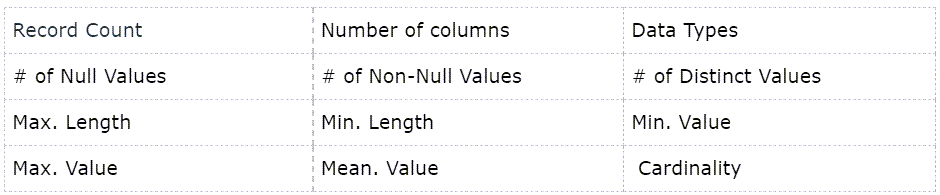
- The prepared data and data profile metrics will be saved as snapshot for using as datasource for subsequent data testing, validation, and data quality checks.
Using Scenario Designer you can:
Perform field-by-field data comparison
- Create a Functional Data Reconciliation Scenario (FDR) which is used for performing field-by-field comparison between source and target datasets. The dataset can be a query previously defined, datasnapshot from a query chain or any supported datasources.
- Data Reconciliation - Field by Field Comparison
- RDBMS, Flatfiles, APIs, Analytics tools as a source
- Compare two datasets
- Discrete dataset comparison
- Disparate data model dataset comparison
- Transform, Blend, Cleanse, enrich data before comparison
- Metrics comparison
- Scenario execution result in history
- Send email alerts with data comparison results
- Integrate with External tool integration(Jira, HPQC, xray etc.)
Validation dataset using Business Rules:
- Create Validation scenario, which is used to define business rules and check the validation rules against supported data sources, pre-defined queries, data snapshots etc.
- Transform, Blend, Cleanse, enrich data before validation
- Create business rules using drag-and-drop UI
- Simple to complex business rule creation
- Display history of Scenario execution
- Send email alerts with business rule validation results
- Integrate with External tool integration(Jira, HPQC, xray, etc.)
Perform Bulk Comparison
- Create technical Data Reconciliation Scenario (TDR), which is used for comparing record count or data between multiple pairs of datasets.
- Compare schema to schema record count
- Compare schema to schema metadata comparison
- Compare a selective list of objects or columns
- Data comparison at a record level (checksum)
Using Job Designer you can:
- Create jobs to logically bundle DataTrust assets (Query Chains, Functional Data Reconciliation Scenarios, Validation Scenarios, and Technical Data Reconciliation Scenarios)
- You can define the dependencies between each step
- Schedule them to run at different intervals.
Using Incident Management Digital Board (IMDB), you can:
- Manage incidents created by DataTrust Scenarios. IMDB is kanban style incident management that comes prepackaged with the application.
- Tickets get created in the IMDB backlog bucket when IMDB option is used as part of scenarios. When the scenario returns exceptions.
- The tickets can be manually moved to the subsequent buckets, be updated with comments, be subscribed, reassigned, etc.