The users can be able to switch the data source connection for a Query from the Global Explorer or Query Explorer session page.
To learn more, let us walk through the below procedure:
- Click the ‘QUERY STUDIO’ module.
- The user is navigated to the ‘Query Explorer’ session page.
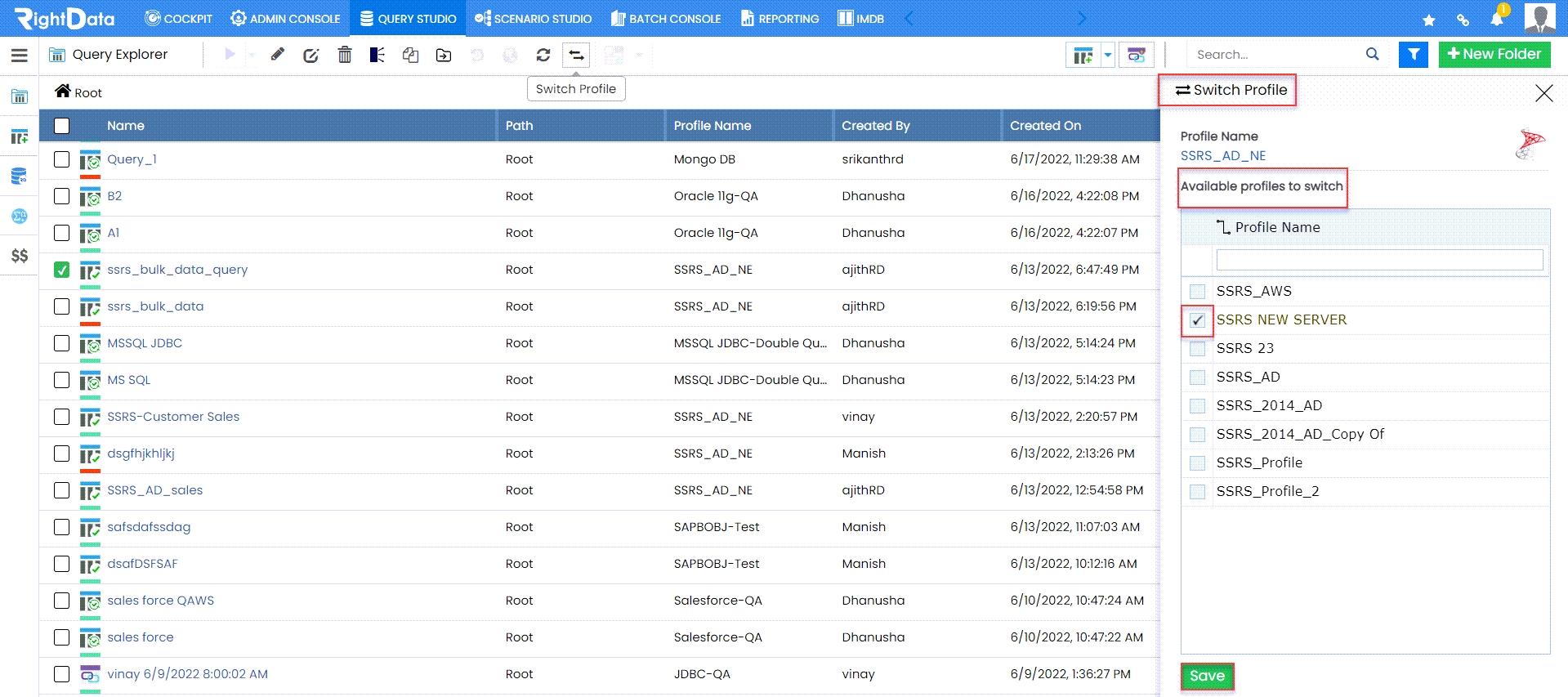
- Select and checkbox the Query ‘ssrs_bulk_data_query.’
- Click the ‘Switch Profile’ button.

- A ‘Switch Profile’ slide screen is displayed on the right side of the page.
- From the ‘Available profiles to switch’, select and checkbox ‘SSRS NEW SERVER.’
- Click the ‘Save’ button.
- A ‘Profile Changed Successfully!’ toaster message is displayed.
- Now, click the ‘Edit’ button.

- This action navigates the user to the Query (ssrs_bulk_data_query) session page in create and edit mode.
- The user can view the ‘Profile’ got switched to ‘SSRS NEW SERVER.’
